Overview
WordPress runs a large share of the web because it is easy to start with. At organizational scale it becomes something else: a content platform that many teams depend on, with real requirements for structure, accessibility, performance, and governance. This case study collects the enterprise WordPress work behind several engagements — the architecture patterns, not a single client's project.
The problem
Organizations reach a point where the default WordPress experience stops fitting. Editors need content models that match how they actually think about their material. Front-end teams want a modern framework without giving up the CMS their staff already know. Accessibility and performance become requirements, not aspirations. And the whole estate has to stay maintainable long after launch.
Constraints
- Editors must keep working in tools they know; the CMS cannot become a developer-only system.
- Existing content and URLs carry SEO equity that migrations must preserve.
- Accessibility is a requirement of the deliverable, not a later audit.
- The architecture has to be handed off and maintained by a team.
The architecture
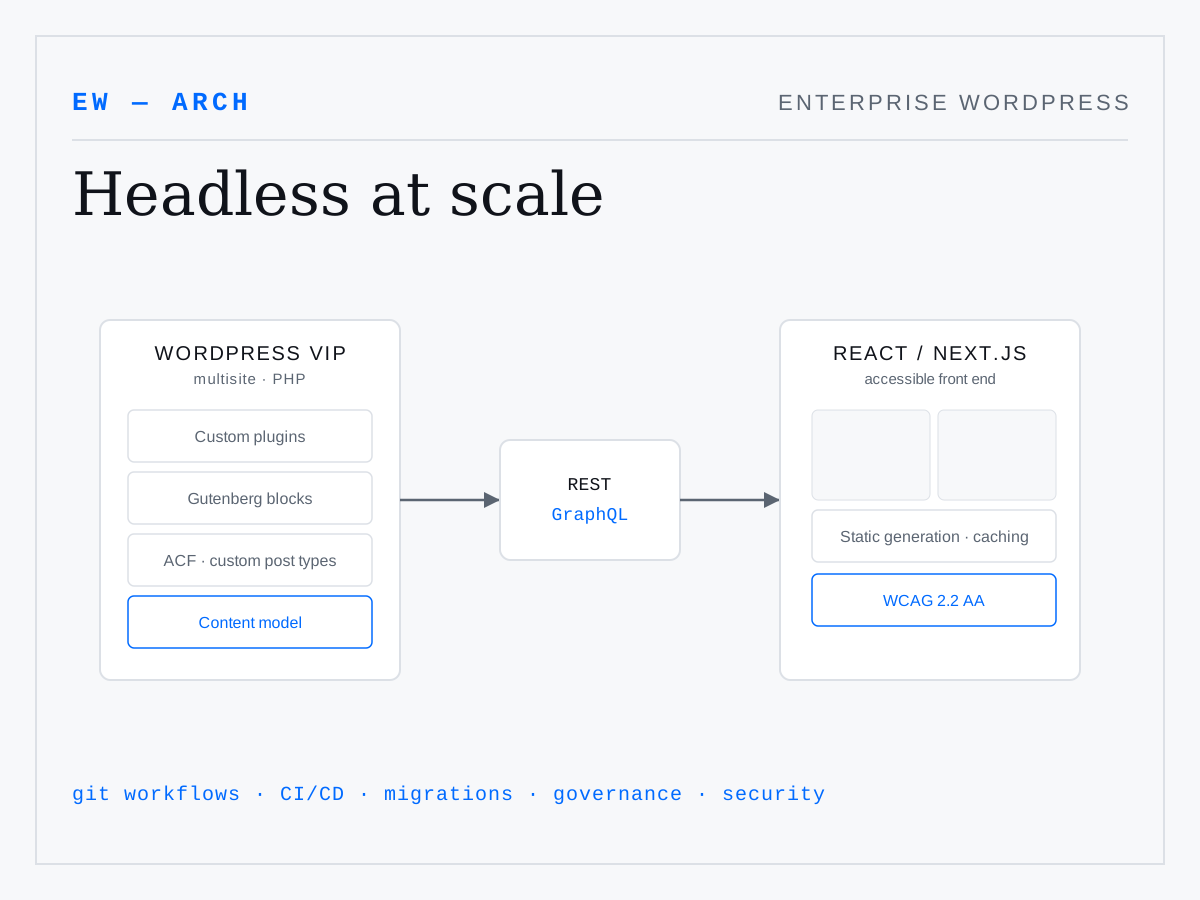
The pattern that resolves these tensions is
headless — but only where it earns its place. WordPress remains the editorial backend: multisite where several properties share governance, custom post types and ACF fields shaped to the real content model, and Gutenberg blocks so editors compose pages visually. That content is exposed through
REST and WPGraphQL and consumed by a
React / Next.js front end that owns presentation, performance, and accessibility.
Not every project needs the headless split. Part of the architecture work is deciding when a well-built classic theme is the right answer and when decoupling pays for its added complexity.
Design and implementation decisions
- Content modeling first. The custom post types and field groups are designed before any template, so structure drives the interface rather than the reverse.
- Accessible custom blocks. Blocks ship with semantic markup, keyboard support, and correct heading structure — accessibility built in, not bolted on.
- Migrations that preserve equity. Redirects and canonical URLs carry old paths forward so search ranking survives the move.
- Governance and CI/CD. Git workflows, review, and automated checks keep a multisite estate consistent as many hands touch it.
Outcome
The result of this approach is enterprise WordPress that stays maintainable: editors keep a familiar authoring experience, front-end teams get a modern framework, accessibility and performance are structural rather than remedial, and the content model is documented well enough to hand off.
What I would emphasize
The recurring lesson is restraint. Headless, custom blocks, and elaborate content models are all powerful and all carry maintenance cost. The architecture that lasts is the one matched to the team that has to run it — which is a judgment call, not a checklist.